
| Feature | Description |
|---|---|
| Theme Name | Doccure |
| Type | Booking Template |
| Purpose | Appointment & Patient Management |
| Booking System | Simple & Easy |
| Doctor Availability | Check & Confirm |
| Doctor’s Dashboard | Patient Details, Appointments |
| Doctor Actions | Accept/Cancel Booking |
| Responsive Layout | Fully Responsive |
| Invoice | View Details |
| Schedule Timing | Set Timings |
| Reviews | Read & Reply |
| Chat System | Communicate |
| Profile | Update/Edit |
| Patient Booking | Doctor Details, Reviews |
| Appointment Booking | Based on Availability |
| Payment | Confirmation & Invoice |
| Patient Dashboard | Booking Details |
| Favorites | Choose Doctor ❤️ |
| Patient Chat | Communicate Directly |
| Patient Profile | Update Info |
| Admin Dashboard | Access All Details |
| Specialties | Add/Edit |
| Admin Chat | Communicate Directly |
| Admin View | Patient Details |
| Voice Call | Consulting 📞 |
| Video Call | Consulting 📹 |
| Patient Dashboard | Details & Updates |
| Doctor Map | Listing & Grid |
| Registration | New Patients |
| Login/Register | Simple |
| Clinic Services | Based on Categories |
| City Selection | View Nearest Clinic |
| Clinic Info | Details & Images |
| Availability | Check & Cost |
| Ratings | Provide & Comment ⭐ |
| Appointment | Simple Process |
| Bootstrap | Version 5 |
| HTML5 & CSS3 | Used |
| Layout | Fully Responsive |
| Icons | Font Awesome, Feather |
| Browser Compatibility | Cross Browser |
| Customization | Easy |
| Code | Clean & Commented |
| Devices | All Mobile Devices |
| Calendar | Customizable |
| Pages | Login, Sign Up |
| Chat View | Available 💬 |
| Error Pages | Included |
| Support | Reliable & Technical |
| Updates | Lifetime Free |
| Response Time | 24 Hours |
| Refund | Not Offered |
| Preview Images | Demo Purpose Only |
| Custom Code | Not Supported |
Strategies Implemented to Ensure Smooth Flow While Accessing and Scheduling Medical Appointments.
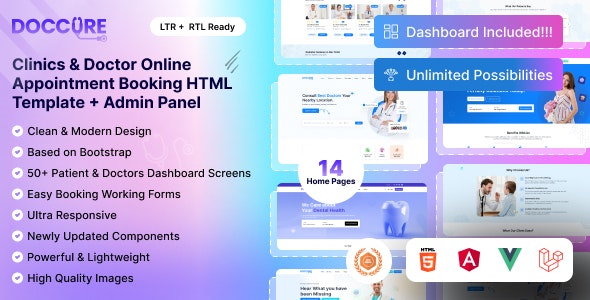
Doccure – Doctor Appointment Booking Template ensures an approach to scheduling appointments as well as accessing doctors. Using this template, the user gets to schedule an appointment and knows what kind of service he can get and what specialist he should consult. In a template, the patient gets the ability to schedule an appointment while the doctor can manage his schedule and appointments.
Doctor’s Dashboard
The doctor’s dashboard is noted to have various functions in terms of managing the appointments made by the patients. Information like every patient’s information, his appointment, and the charges he needs to pay is present in it. There is the ability to accept or reject the bookings, choose a certain time for availability, read and reply to the reviews posted by the patients. The complaints of the patients help increase the productivity of the business and instantly resolve any kind of conflicts. Accounts receivable and patient engagement present in the dashboard improve the overall efficiency of the system.
Patient Booking
There is no difficulty faced by the patient while booking an appointment. Internet-based services are provided and there is detailed information available about each doctor, and it includes the doctor’s specialization, reviews, location, fees, and the time when the doctor is open for work. Booking is done according to the doctor’s schedule and there is a notification along with an invoice report after the patient makes the booking. Booking management, favorites, patient editing, and communication features with the doctors are present in the patient desktop.
Admin Dashboard Contains a Detailed Portion of Patient and Doctor Information The admin allows full access to all information regarding doctors and patients. They are able to see the appointment schedule, payments made, invoices, reviews, etc. They are, in addition, able to create new specialties and manage the communication of patients with doctors. Such integrated control helps to handle the whole system efficiently.
Feature-Rich Template Doccure has more than that to enrich user activity. It allows voice and video call consultations, a list of doctors on a map, and a powerful chat. The template design is done with the help of Bootstrap 5, HTML5, and CSS3, so the template is fully responsive and works on all devices. Custom calendar designs, error pages, login and signup pages, etc. win here.
Additional Features Doccure also contains cross-browser compatibility, Font Awesome and Feather icons, and easy-to-edit clean code. The spinning template is rich with all its usability features and hence does not jeopardize the user experience. It also comprises all the relevant documents and reliable user support from Monday to Friday to enable users to get any assistance.
Conclusion
As a final note, Doccure – Doctor Appointment Booking Template is most suitable for those users whose business is connected with the booking of appointments in clinics and other medical establishments. It possesses a lot of features, convenient instruments for doctors, patients, and administrators, and flexibility of use, which makes it extremely helpful when improving medical services.
An amazing template with a very helpful support team. I have integrated this with a Django backend. The response and load time is a breeze, plus it has given our app a clean and modern design in addition to saving us hours of front-end development! Good job Dreamguys!
Excellence is what runs through the veins of the amazing support team and that’s what delivers sweetness to the quality of Design, Code, Features, and Documentation.
The support is very helpful. They helped to resolve necessary changes to my project.
The template is complete. We got a front-end template, and also a back-end template (admin template). You can also mix the assets for front-end and back-end to get something more custom. I was surprised when I purchased this theme; they give ten other custom templates. So we can choose what color scheme we want to use and have many possibilities to create custom designs by mixing several schemes. This template works; we just need to learn how to integrate the template with the web service we made like Laravel, Django, and others. Shout out to the teams that made this great template. Thanks!